

Get 100% Passing Success With True Associate-Android-Developer Exam! [Aug-2021]
Google Associate-Android-Developer PDF Questions - Exceptional Practice To Google Developers Certification - Associate Android Developer (Kotlin and Java Exam)
NEW QUESTION 35
With recommended app architecture. Fill the following diagram, which shows how all the modules usually should interact with one another after designing the app (drag modules to correct places).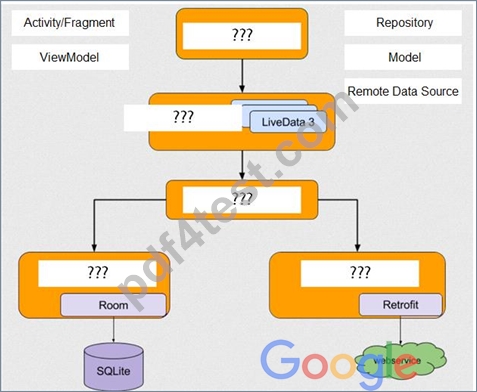
Answer:
Explanation: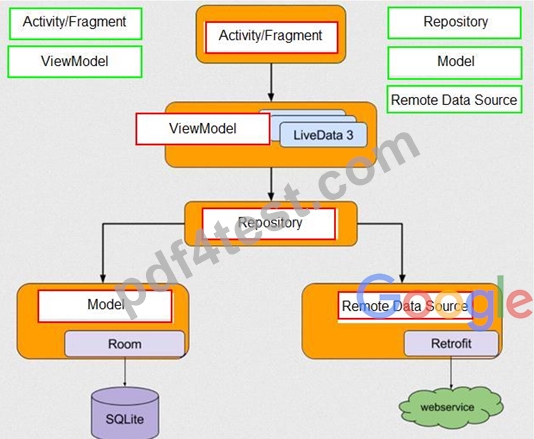
NEW QUESTION 36
When your code execution reaches the breakpoint, Android Studio pauses execution of your app. You can then use the tools in the Debugger tab to identify the state of the app. With Step Over you can
- A. evaluate an expression at the current execution point
- B. continue running the app normally
- C. advance to the next line outside the current method
- D. advance to the first line inside a method call
- E. examine the object tree for a variable; expand it in the Variables view.
- F. advance to the next line in the code (without entering a method)
Answer: F
NEW QUESTION 37
In a class extended PreferenceFragmentCompat. What method is used to inflate the given XML resource and add the preference hierarchy to the current preference hierarchy?
- A. setPreferenceScreen
- B. findPreference
- C. getPreferenceManager
- D. addPreferencesFromResource
Answer: D
NEW QUESTION 38
In application theme style, value statusBarColor (<item name="android:statusBarColor">) means:
- A. The color for the navigation bar. If the color is not opaque, consider setting View.SYSTEM_UI_FLAG_LAYOUT_STABLE and View.SYSTEM_UI_FLAG_LAYOUT_HIDE_NAVIGATION. For this to take effect, the window must be drawing the system bar backgrounds with R.attr.windowDrawsSystemBarBackgrounds and the navigation bar must not have been requested to be translucent with R.attr.windowTranslucentNavigation.
Corresponds to Window.setNavigationBarColor(int). - B. The color for the status bar. If the color is not opaque, consider setting View.SYSTEM_UI_FLAG_LAYOUT_STABLE and View.SYSTEM_UI_FLAG_LAYOUT_FULLSCREEN.
For this to take effect, the window must be drawing the system bar backgrounds with R.attr.windowDrawsSystemBarBackgrounds and the status bar must not have been requested to be translucent with R.attr.windowTranslucentStatus. Corresponds to Window.setStatusBarColor(int). - C. Shows a thin line of the specified color between the navigation bar and the app content.
For this to take effect, the window must be drawing the system bar backgrounds with R.attr.windowDrawsSystemBarBackgrounds and the navigation bar must not have been requested to be translucent with R.attr.windowTranslucentNavigation. Corresponds to Window.setNavigationBarDividerColor(int). - D. Color of text (usually same as colorForeground).
Answer: B
Explanation:
Reference:
https://developer.android.com/guide/topics/ui/look-and-feel/themes https://developer.android.com/reference/android/R.styleable.html
NEW QUESTION 39
By default, the notification's text content is truncated to fit one line. If you want your notification to be longer, for example, to create a larger text area, you can do it in this way:
- A. NotificationCompat.Builder builder = new NotificationCompat.Builder(this, CHANNEL_ID)
.setContentText("Much longer text that cannot fit one line...")
.setTheme(android.R.style.Theme_LongText);
... - B. NotificationCompat.Builder builder = new NotificationCompat.Builder(this, CHANNEL_ID)
.setContentText("Much longer text that cannot fit one line...")
.setLongText("Much longer text that cannot fit one line..."))
... - C. NotificationCompat.Builder builder = new NotificationCompat.Builder(this, CHANNEL_ID)
.setContentText("Much longer text that cannot fit one line...")
.setStyle(new NotificationCompat.BigTextStyle()
.bigText("Much longer text that cannot fit one line..."))
...
Answer: C
Explanation:
Reference:
https://developer.android.com/training/notify-user/build-notification
NEW QUESTION 40
As an example. In an Activity we have our TimerViewModel object (extended ViewModel), named mTimerViewModel. mTimerViewModel.timer method returns a LiveData<Long> value. What can be a correct way to set an observer to change UI in case if data was changed?
- A. mTimerViewModel.observe
(Observer { aLong -> callAnyChangeUIMethodHere(aLong!!) }) - B. mTimerViewModel!!.timer.value.toString().observe
(Observer { aLong -> callAnyChangeUIMethodHere(aLong!!) }) - C. mTimerViewModel!!.timer.observe
(this, Observer { aLong -> callAnyChangeUIMethodHere(aLong!!) })
Answer: C
NEW QUESTION 41
Choose the most correct statement.
- A. Android is an open source software stack created for a highly limited array of devices and form factors.
- B. Android is a closed source, Windows-based software stack created for a wide array of devices and form factors.
- C. Android is a closed source, Linux-based software stack created for a wide array of devices and form factors.
- D. Android is an open source, Linux-based software stack created for a wide array of devices and form factors.
Answer: D
Explanation:
Reference:
https://developer.android.com/guide/platform
NEW QUESTION 42
We have a custom view that extends android.widget.ProgressBar. Our progress bar is not touchable, focusable, etc.: it just shows progress. Style for our custom progress bar extends
"Widget.AppCompat.ProgressBar.Horizontal". An item, named "progressDrawable", in our style, is a xml file . What we usually can see as a main single element in this xml file:
- A. A State List (<selector> element )
- B. A Layer List (<layer-list> element) with items android:id="@+id/progress" and android:id="@+id/ background" inside it.
- C. An <ImageView> element with android:id="@+id/progress" identifier
Answer: B
Explanation:
Reference:
https://developer.android.com/guide/topics/resources/drawable-resource
NEW QUESTION 43
"workManager" is an instance of WorkManager. Select correct demonstration of WorkRequest cancellation:
- A. WorkRequest request1 = new OneTimeWorkRequest.Builder(FooWorker.class).build(); WorkRequest request2 = new OneTimeWorkRequest.Builder(BarWorker.class).build (); WorkRequest request3 = new OneTimeWorkRequest.Builder(BazWorker.class).build (); workManager.beginWith(request1, request2).then(request3).enqueue();
- B. WorkRequest request = new OneTimeWorkRequest.Builder(FooWorker.class).build(); workManager.enqueue(request); LiveData<WorkInfo> status = workManager.getWorkInfoByIdLiveData(request.getId ()); status.observe(...);
- C. WorkRequest request = new OneTimeWorkRequest.Builder(FooWorker.class).build(); workManager.enqueue(request); workManager.cancelWork(request);
- D. workManager.enqueue(new OneTimeWorkRequest.Builder(FooWorker.class).build());
- E. WorkRequest request = new OneTimeWorkRequest.Builder(FooWorker.class).build(); workManager.enqueue(request); workManager.cancelWorkById(request.getId());
Answer: E
Explanation:
Working with WorkManager, from the 2018 Android Dev Summit WorkManager: Beyond the basics, from the 2019 Android Dev Summit Reference:
https://developer.android.com/reference/androidx/work/WorkManager?hl=en
NEW QUESTION 44
For example, we have a BufferedReader reader, associated with the json file through InputStreamReader. To get a file data we can do this:
- A. JSONObject line; try {
while ((line = reader.readJSONObject ()) != null) { builder.append(line);
}
JSONObject json = new JSONObject(builder.toString());
return json;
} catch (IOException | JSONException exception) {
exception.printStackTrace();
} - B. String line; try {
while ((line = reader.readLine()) != null) { builder.append(line);
}
JSONObject json = new JSONObject(builder.toString());
return json;
} catch (IOException | JSONException exception) {
exception.printStackTrace();
} - C. String line; try {
while ((line = reader.readLine()) != null) { builder.append(line);
}
JSONObject json = new JSONObject(builder.toString());
return json;
} catch (RuntimeException|ArrayIndexOutOfBoundsException exception) {
exception.printStackTrace();
}
Answer: B
NEW QUESTION 45
The diagram below shows a basic form of the recommended architecture for apps that use Architecture Components. The architecture consists of a UI controller, a ViewModel that serves LiveData, a Repository, and a Room database. Drag modules to correct places.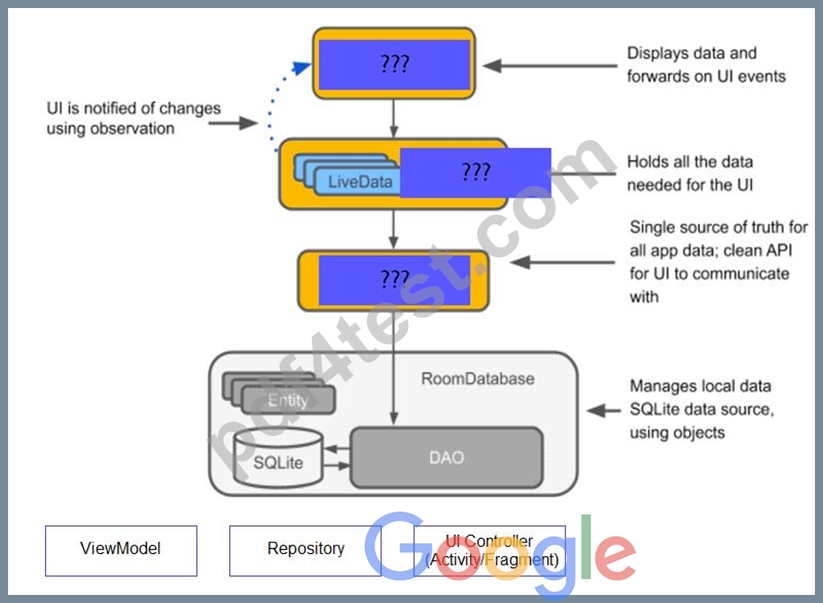
Answer:
Explanation: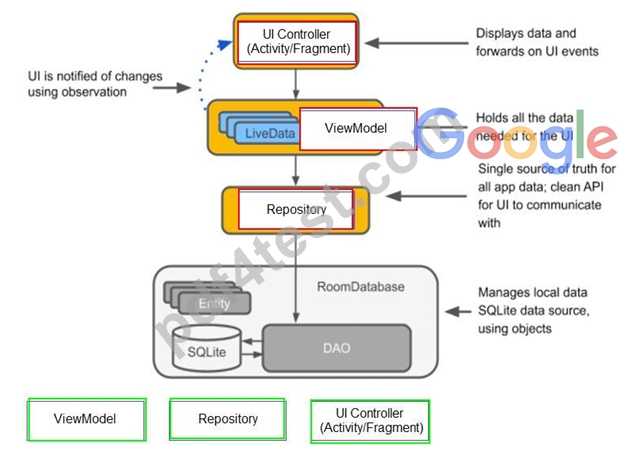
NEW QUESTION 46
When your code execution reaches the breakpoint, Android Studio pauses execution of your app. You can
- A. evaluate an expression at the current execution point
- B. continue running the app normally
- C. advance to the next line in the code (without entering a method)
- D. advance to the first line inside a method call
- E. advance to the next line outside the current method
- F. examine the object tree for a variable; expand it in the Variables view. If the Variables view is not visible
Answer: E
NEW QUESTION 47
In application theme style, flag windowActionBar (<item name="windowActionBar">) indicates:
- A. whether this window should have an Action Bar in place of the usual title bar.
- B. whether action modes should overlay window content when there is not reserved space for their UI (such as an Action Bar).
- C. whether the given application component is available to other applications.
- D. whether this window's Action Bar should overlay application content.
Answer: A
Explanation:
Reference:
https://developer.android.com/guide/topics/ui/look-and-feel/themes https://developer.android.com/reference/android/R.styleable.html
NEW QUESTION 48
The following code snippet shows an example of an Espresso test:
- A. @Test
fun greeterSaysHello() {
onView(withId(R.id.name_field)).perform(typeText("Steve"))
onView(withId(R.id.greet_button)).perform(click())
onView(withText("Hello Steve!")).check(matches(isDisplayed()))
} - B. @Rule
fun greeterSaysHello() {
onView(withId(R.id.name_field)).do(typeText("Steve"))
onView(withId(R.id.greet_button)).do(click())
onView(withText("Hello Steve!")).check(matches(isDisplayed()))
} - C. @Test
fun greeterSaysHello() {
onView(withId(R.id.name_field)).do(typeText("Steve"))
onView(withId(R.id.greet_button)).do(click())
onView(withText("Hello Steve!")).compare(matches(isDisplayed()))
}
Answer: A
NEW QUESTION 49
For example, we have a file in our raw folder app/src/main/res/raw/sample_teas.json. To get an InputStream for reading it, from out Context context, we can do this:
- A. val input = context!!.getRawResource(R.raw.sample_teas)
- B. val input = context!!.openRawResource(R.raw.sample_teas)
- C. val input = context!!.resources.openRawResource(R.raw.sample_teas)
Answer: C
NEW QUESTION 50
Android Tests. You can use the childSelector() method to nest multiple UiSelector instances. For example, the following code example shows how your test might specify a search to find the first ListView in the currently displayed UI, then search within that ListView to find a UI element with the text property Apps.
What is the correct sample?
- A. val appItem: UiObject = device.findObject( UiSelector().className("android.widget.ListView")
.instance(
UiSelector().text("Apps")
)
) - B. val appItem: UiObject = device.findObject( UiSelector().className(ListView.class)
.instance(1)
.childSelector(
UiSelector().text("Apps")
)
) - C. val appItem: UiObject = device.findObject( UiSelector().className("android.widget.ListView")
.instance(0)
.childSelector(
UiSelector().text("Apps")
)
)
Answer: C
NEW QUESTION 51
What is the incorrect statement about Data Access Object (androidx.room.Dao)?
- A. The class marked with @Dao should either be an interface or an abstract class. At compile time, Room will generate an implementation of this class when it is referenced by a Database.
- B. Data Access Objects are the main classes where you define your database interactions. They can include a variety of query methods.
- C. An abstract @Dao class can optionally have a constructor that takes a Database as its only parameter.
- D. It is recommended to have only one Dao class in your codebase for all tables.
Answer: D
NEW QUESTION 52
Building your app from the command line, if you have a "demo" product flavor, then you can build the debug version with the command:
- A. gradlew assembleDemoDebug
- B. both variants are correct.
- C. gradlew installDemoDebug
Answer: B
Explanation:
Before immediately install build on a running emulator or connected device, installDemoDebug cause an APK building.
Reference:
https://developer.android.com/studio/run
NEW QUESTION 53
......
Associate-Android-Developer dumps - PDF4Test - 100% Passing Guarantee: https://www.pdf4test.com/Associate-Android-Developer-dump-torrent.html
