

Get 2021 Updated Free Google Associate-Android-Developer Exam Questions & Answer
Associate-Android-Developer Dumps PDF and Test Engine Exam Questions
Testing
- Ability to write local JUnit tests that are useful.
- Knowing how to write useful automated Android tests.
- Understanding the basics of testing in depth.
- Recognizing the Espresso UI test framework.
Target Audience and Prerequisites
The target candidates for this certification are Android Developers. These professionals have the skills and competence in the topics of the prerequisite exam. The individuals who want to pursue a career as an Android Developer can also take the test and earn the certificate. The exam evaluates the skills and knowledge of the entry-level Android Developers. The students for this test should possess the foundational level of competence and proficiency. They can gain the prerequisite knowledge through self-study or education. They can also develop practical experience through the role-based jobs. It is recommended that the applicants possess a solid understanding of the objectives contained in the exam before sitting for it.
NEW QUESTION 37
With a room database. When performing queries, you'll often want your app's UI to update automatically when the data changes. Can you use a return value of type LiveData in your query method description to achieve this?
- A. Yes
- B. No
Answer: A
Explanation:
Room generates all necessary code to update the LiveData when the database is updated.
NEW QUESTION 38
What is a correct part of an Implicit Intent for sharing data implementation?
- A. Intent sendIntent = new Intent(); sendIntent.setAction(Intent.ACTION_SEND);
- B. Intent sendIntent = new Intent(); sendIntent.setType(Intent.ACTION_SEND);
- C. Intent sendIntent = new Intent(this, UploadService.class) sendIntent.putExtra(Intent.EXTRA_TEXT, textMessage);
- D. Intent sendIntent = new Intent(this, UploadService.class) sendIntent.setData(Uri.parse(fileUrl));
Answer: A
Explanation:
Create the text message with a string
Intent sendIntent = new Intent(); sendIntent.setAction(Intent.ACTION_SEND); sendIntent.putExtra(Intent.EXTRA_TEXT, textMessage); sendIntent.setType("text/plain"); Reference:
https://developer.android.com/guide/components/fundamentals
NEW QUESTION 39
The easiest way of adding menu items (to specify the options menu for an activity) is inflating an XML file into the Menu via MenuInflater. With menu_main.xml we can do it in this way:
- A. override fun onCreateOptionsMenu(menu: Menu): Boolean { menuInflater.inflate(R.menu.menu_main, menu) return true
} - B. override fun onOptionsItemSelected(item: MenuItem): Boolean {
menuInflater.inflate(R.menu.menu_main, menu) return super.onOptionsItemSelected(item)
} - C. override fun onCreate(savedInstanceState: Bundle?) { super.onCreate(savedInstanceState) setContentView(R.menu.menu_main)
}
Answer: A
Explanation:
Reference:
https://developer.android.com/guide/topics/ui/accessibility/custom-views
NEW QUESTION 40
In general, you should send an AccessibilityEvent whenever the content of your custom view changes. For example, if you are implementing a custom slider bar that allows a user to select a numeric value by pressing the left or right arrows, your custom view should emit an event of type TYPE_VIEW_TEXT_CHANGED whenever the slider value changes. Which one of the following sample codes demonstrates the use of the sendAccessibilityEvent() method to report this event.
- A. override fun onKeyUp(keyCode: Int, event: KeyEvent): Boolean { return when(keyCode) { KeyEvent.KEYCODE_DPAD_LEFT -> { currentValue-- sendAccessibilityEvent(AccessibilityEvent.TYPE_VIEW_TEXT_CHANGED) true
}
...
}
} - B. override fun dispatchPopulateAccessibilityEvent(event: AccessibilityEvent): Boolean { return super.dispatchPopulateAccessibilityEvent(event).let { completed -> if (text?.isNotEmpty() == true) { event.text.add(text) true
} else {
completed
}
}
} - C. override fun onKeyUp(keyCode: Int, event: KeyEvent): Boolean { return when(keyCode) { KeyEvent.KEYCODE_ENTER -> { currentValue-- sendAccessibilityEvent (AccessibilityEvent.TYPE_VIEW_CONTEXT_CLICKED) true
}
...
}
}
Answer: A
NEW QUESTION 41
In a class extended PreferenceFragmentCompat. What method is used to inflate the given XML resource and add the preference hierarchy to the current preference hierarchy?
- A. getPreferenceManager
- B. setPreferenceScreen
- C. addPreferencesFromResource
- D. findPreference
Answer: C
NEW QUESTION 42
To build a debug APK, you can open a command line and navigate to the root of your project directory. To initiate a debug build, invoke the assembleDebug task:
gradlew assembleDebug
This creates an APK named [module_name]-debug.apk in [project_name]/[module_name]/build/outputs/apk/ Select correct statements about generated file. (Choose all that apply.)
- A. You can immediately install this file on a device.
- B. The file is already aligned with zipalign
- C. The file is already signed with the debug key
Answer: A,B,C
Explanation:
Reference:
https://developer.android.com/studio/run
NEW QUESTION 43
Filter logcat messages. If in the filter menu, a filter option "Edit Filter Configuration"? means:
- A. Apply no filters. Logcat displays all log messages from the device, regardless of which process you selected.
- B. Create or modify a custom filter. For example, you could create a filter to view log messages from two apps at the same time.
- C. Display the messages produced by the app code only (the default). Logcat filters the log messages using the PID of the active app.
Answer: B
NEW QUESTION 44
For example, we have a file in our raw folder app/src/main/res/raw/sample_teas.json. To get an InputStream for reading it, from out Context context, we can do this:
- A. InputStream input = context.openRawResource(R.raw.sample_teas);
- B. InputStream input = context.getRawResource(R.raw.sample_teas);
- C. InputStream input = context.getResources().openRawResource(R.raw.sample_teas);
Answer: C
NEW QUESTION 45
What is the incorrect statement about Data Access Object (androidx.room.Dao)?
- A. Data Access Objects are the main classes where you define your database interactions. They can include a variety of query methods.
- B. The class marked with @Dao should either be an interface or an abstract class. At compile time, Room will generate an implementation of this class when it is referenced by a Database.
- C. It is recommended to have only one Dao class in your codebase for all tables.
- D. An abstract @Dao class can optionally have a constructor that takes a Database as its only parameter.
Answer: C
NEW QUESTION 46
If you want get a debuggable APK that people can install without adb, in Android Studio you can:
- A. Select your debug variant and click Analyze APK.
- B. Click the Run button from toolbar
- C. Select your debug variant and click Build Bundle(s) / APK(s) > Build APK(s).
Answer: C
Explanation:
The Run button builds an APK with testOnly="true", which means the APK can only be installed via adb (which Android Studio uses). If you want a debuggable APK that people can install without adb, select your debug variant and click Build Bundle(s) / APK(s) > Build APK(s).
Reference:
https://developer.android.com/studio/run
NEW QUESTION 47
By adding a RoomDatabase.Callback to the room database builder RoomDatabase.Builder (method addCallback(RoomDatabase.Callback callback)), we can: (Choose two.)
- A. disable the main thread query check for Room
- B. set the database factory
- C. handle database opening
- D. handle database first time creation
Answer: C,D
NEW QUESTION 48
The Testing Pyramid, shown in the Figure, illustrates how your app should include the three categories of tests: small, medium, and large. Small tests are unit tests that :
- A. validate user journeys spanning multiple modules of your app.
- B. validate your app's behavior one class at a time.
- C. validate either interactions between levels of the stack within a module, or interactions between related modules.
Answer: B
NEW QUESTION 49
When using an ImageView, ImageButton, CheckBox, or other View that conveys information graphically. What attribute to use to provide a content label for that View?
- A. android:contentDescription
- B. android:labelFor
Explanation - C. android:hint
Answer: A
Explanation:
Reference:
https://support.google.com/accessibility/android/answer/7158690?hl=en
NEW QUESTION 50
What do you want from Room when you create a DAO method and annotate it with @Update?
Example:
@Dao
interface MyDao {
@Update
fun updateUsers(vararg users: User)
}
- A. Room modifies a set of entities, given as parameters, in the database. It uses a query that matches against the primary key of each entity.
- B. Room removes a set of entities, given as parameters, from the database. It uses the primary keys to find the entities to delete.
- C. Room generates an implementation that inserts all parameters into the database in a single transaction.
Answer: A
NEW QUESTION 51
What method should we use with Notification.Builder to supply a PendingIntent to be sent when the notification is clicked?
- A. setContentInfo
- B. setContentIntent
- C. setDeleteIntent
Answer: B
Explanation:
Reference:
https://developer.android.com/training/notify-user/build-notification
NEW QUESTION 52
About queries in DAO classes. Room verifies the return value of the query such that if the name of the field in the returned object doesn't match the corresponding column names in the query response, Room alerts you in one of the following two ways: (Choose two.)
- A. It gives a warning if only some field names match.
- B. It gives an error if only some field names match.
- C. It gives an error if no field names match.
- D. It gives a warning if no field names match.
Answer: A,C
NEW QUESTION 53
Working with Custom View. To define custom attributes, we can add <declare-styleable> resources to our project. It is customary to put these resources into a file:
- A. res/values/attrs.xml
- B. res/xml/attrs.xml
- C. res/raw/attrs.xml
- D. res/layout/attrs.xml
Answer: A
Explanation:
Reference:
https://developer.android.com/guide/topics/ui/custom-components
NEW QUESTION 54
In our TeaViewModel class, that extends ViewModel, we have such prorerty:
val tea: LiveData<Tea>
An observer in our Activity (type of mViewModel variable in example is TeaViewModel) is set in this way:
mViewModel!!.tea.observe(this, Observer { tea: Tea? -> displayTea(tea) }) What will be a correct displayTea method definition?
- A. private fun displayTea()
- B. private fun displayTea(tea: LiveData?<T>)
- C. private fun displayTea(tea: Tea?)
- D. private fun displayTea(tea: LiveData?<Tea>)
Answer: C
NEW QUESTION 55
In a common Paging Library architecture scheme, move instances to the correct positions.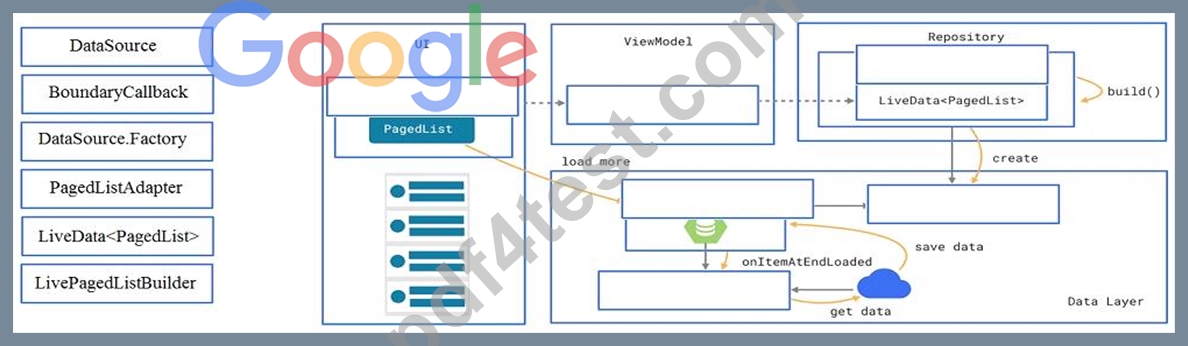
Answer:
Explanation: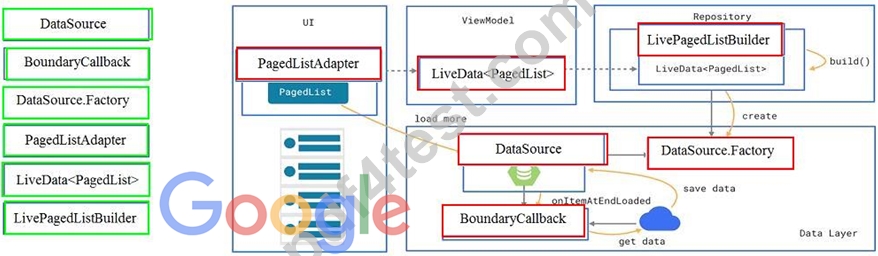
Reference:
https://developer.android.com/topic/libraries/architecture/paging/ui
NEW QUESTION 56
What statements about InputStreamReader (java.io.InputStreamReader) are correct? (Choose two.)
- A. Each invocation of one of an InputStreamReader's read() methods may cause one or more bytes to be read from the underlying byte-input stream. To enable the efficient conversion of bytes to characters, more bytes may be read ahead from the underlying stream than are necessary to satisfy the current read operation.
- B. An InputStreamReader is a bridge from byte streams to character streams: It reads bytes and decodes them into characters using a specified charset. The charset that it uses may be specified by name or may be given explicitly, or the platform's default charset may be accepted.
- C. An InputStreamReader is a bridge from character streams to byte streams: It reads characters using a specified charset and encodes them into bytes. The charset that it uses may be specified by name or may be given explicitly, or the platform's default charset may be accepted.
- D. No any invocation of one of an InputStreamReader's read() methods can cause some bytes to be read from the underlying byte-input stream.
Answer: A,B
NEW QUESTION 57
When your code execution reaches the breakpoint, Android Studio pauses execution of your app. You can
- A. advance to the next line in the code (without entering a method)
- B. continue running the app normally
- C. advance to the next line outside the current method
- D. evaluate an expression at the current execution point
- E. advance to the first line inside a method call
- F. examine the object tree for a variable; expand it in the Variables view
Answer: D
NEW QUESTION 58
Under the hood WorkManager uses an underlying job dispatching service based on the following criteri a. You need to move services to the correct places.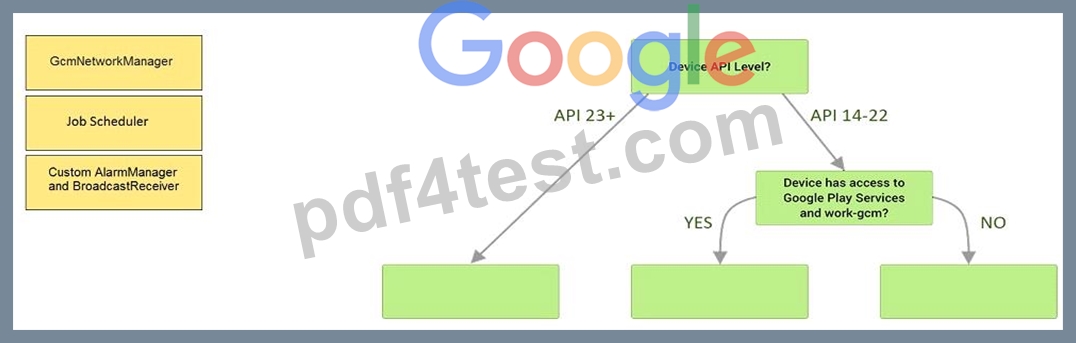
Answer:
Explanation: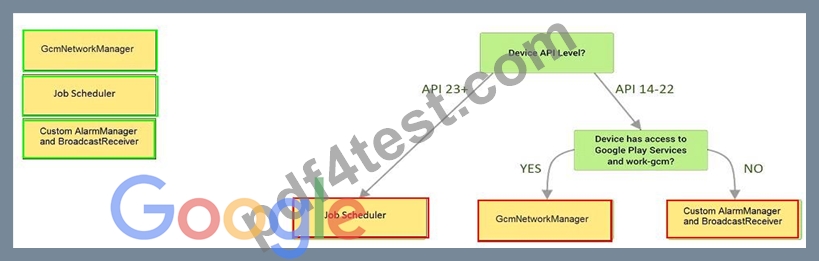
Explanation:
Videos:
Working with WorkManager, from the 2018 Android Dev Summit
WorkManager: Beyond the basics, from the 2019 Android Dev Summit
Reference:
https://developer.android.com/reference/androidx/work/WorkManager?hl=en
NEW QUESTION 59
To create a basic JUnit 4 test class, create a class that contains one or more test methods. A test method begins with the specific annotation and contains the code to exercise and verify a single functionality in the component that you want to test. What is the annotation?
- A. @Test
- B. @LargeTest
- C. @Rule
- D. @RunWith
Answer: A
NEW QUESTION 60
To run your local unit tests, follow these steps:
1. Be sure your project is synchronized with Gradle by clicking Sync Project in the toolbar.
2. Run your test in one of the following ways (select possible): (Choose three.)
- A. To run all tests in a directory, right-click on the directory and select Run tests .
- B. To test all methods in a class, right-click a class or method in the test file and click Run .
- C. To run all tests in Project, open the Project window, and then right-click a test and click Run .
- D. To run a single test, open the Project window, and then right-click a test and click Run .
Answer: A,B,D
NEW QUESTION 61
......
Content Outline
Concerning the current syllabus, the exam is broken down into five major sections such as:
App functionality and Android core
- Using WorkManager to schedule a background job.
- Ability to recognize the Android system's structure.
- Capability on localizing an app.
- Showcasing the knowledge in using a Toast or a Snackbar to display quick messages in a popup.
- Ability to display a message outside of your app's UI.
Verified Associate-Android-Developer exam dumps Q&As with Correct 125 Questions and Answers: https://www.pdf4test.com/Associate-Android-Developer-dump-torrent.html
